Bài viết hướng dẫn cài đặt APISIX cluster HA trên Linux với 2 node Rocky Linux 8, sử dụng etcd cluster để lưu config chung, HAProxy làm load balancer và Keepalived tạo VIP — đảm bảo khi một node down, node còn lại tự động tiếp quản mà không cần can thiệp thủ công.
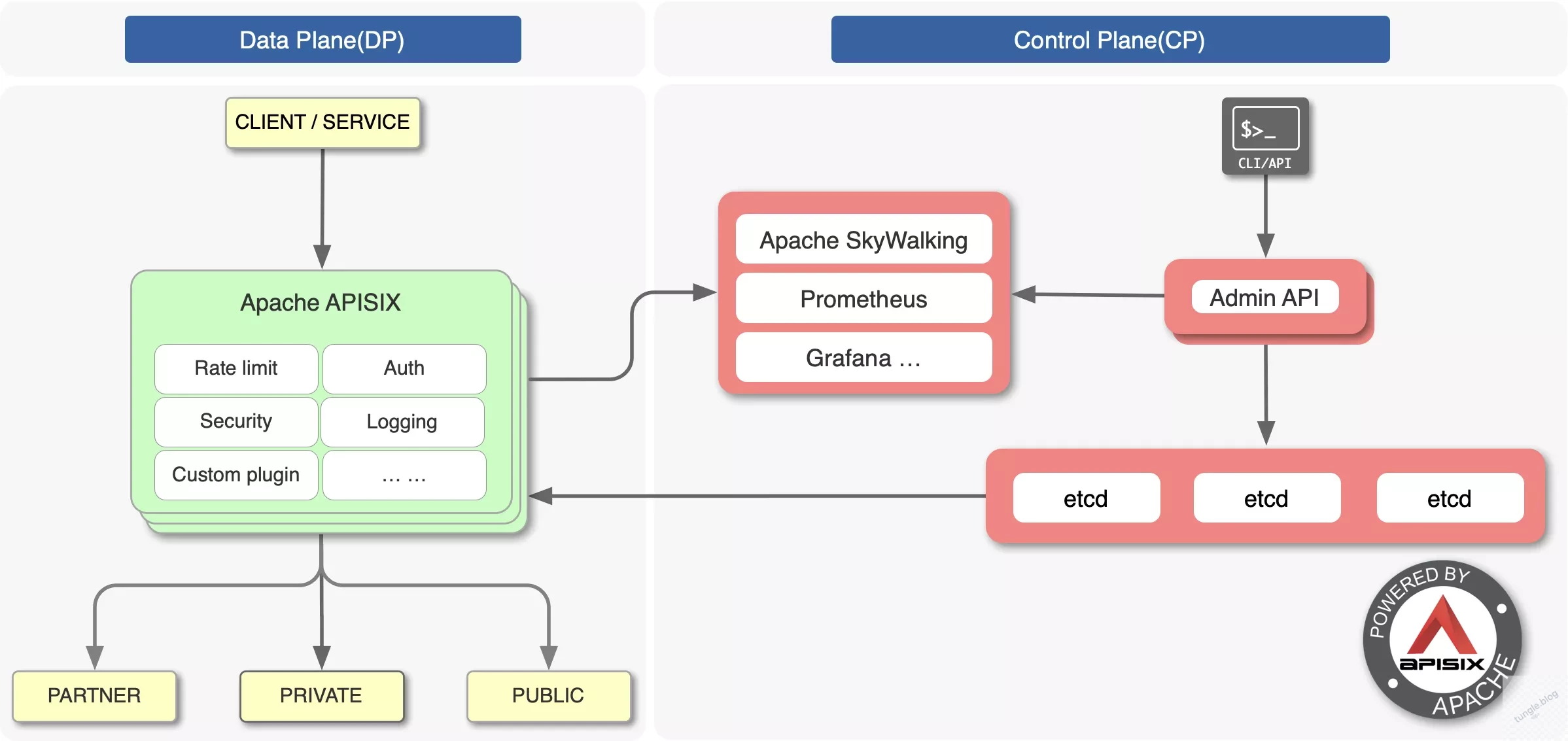
Kiến Trúc Cụm APISIX Cluster HA
Môi trường lab sử dụng 2 VM:
- master1: 192.168.218.132
- master2: 192.168.218.134
- VIP: 192.168.218.200 (do Keepalived quản lý)
Mỗi node chạy đầy đủ: etcd + APISIX + HAProxy + Keepalived. Người dùng chỉ truy cập qua VIP — khi master1 down, Keepalived tự chuyển VIP sang master2.
|
1 2 3 4 5 6 7 8 |
VIP: 192.168.218.200 | +----------------+----------------+ | | master1 (192.168.218.132) master2 (192.168.218.134) etcd + apisix etcd + apisix haproxy + keepalived haproxy + keepalived |
Bước 1: Chuẩn Bị Môi Trường (Chạy Trên Cả 2 Node)
|
1 2 3 4 5 6 7 |
sudo dnf update -y sudo dnf install -y epel-release sudo dnf install -y wget curl vim net-tools tar keepalived haproxy sudo systemctl disable firewalld --now sudo setenforce 0 sudo sed -i 's/^SELINUX=enforcing/SELINUX=disabled/' /etc/selinux/config |
Thêm vào /etc/hosts trên cả hai node:
|
1 2 3 4 |
192.168.218.132 master1 192.168.218.134 master2 192.168.218.200 apisix-vip |
Set hostname:
|
1 2 3 |
hostnamectl set-hostname master1 # trên node 1 hostnamectl set-hostname master2 # trên node 2 |
Bước 2: Cài Đặt APISIX Cluster HA — Phần etcd
etcd là thành phần lưu toàn bộ config của APISIX, phải cài trước. APISIX yêu cầu etcd tối thiểu v3.4.0.
Cài Binary etcd
|
1 2 3 4 5 6 |
ETCD_VER=v3.5.14 wget https://github.com/etcd-io/etcd/releases/download/${ETCD_VER}/etcd-${ETCD_VER}-linux-amd64.tar.gz tar xzvf etcd-${ETCD_VER}-linux-amd64.tar.gz sudo mv etcd-${ETCD_VER}-linux-amd64/etcd* /usr/local/bin/ sudo mkdir -p /etc/etcd /var/lib/etcd |
Cấu Hình etcd Trên master1
Tạo file /etc/etcd/etcd.conf.yml trên master1:
|
1 2 3 4 5 6 7 8 9 10 |
name: master1 data-dir: /var/lib/etcd listen-peer-urls: http://192.168.218.132:2380 listen-client-urls: http://192.168.218.132:2379,http://127.0.0.1:2379 initial-advertise-peer-urls: http://192.168.218.132:2380 advertise-client-urls: http://192.168.218.132:2379 initial-cluster-token: etcd-cluster-1 initial-cluster: master1=http://192.168.218.132:2380,master2=http://192.168.218.134:2380 initial-cluster-state: new |
Cấu Hình etcd Trên master2
|
1 2 3 4 5 6 7 8 9 10 |
name: master2 data-dir: /var/lib/etcd listen-peer-urls: http://192.168.218.134:2380 listen-client-urls: http://192.168.218.134:2379,http://127.0.0.1:2379 initial-advertise-peer-urls: http://192.168.218.134:2380 advertise-client-urls: http://192.168.218.134:2379 initial-cluster-token: etcd-cluster-1 initial-cluster: master1=http://192.168.218.132:2380,master2=http://192.168.218.134:2380 initial-cluster-state: new |
Tạo Systemd Service Cho etcd
File /etc/systemd/system/etcd.service (giống nhau trên cả 2 node):
|
1 2 3 4 5 6 7 8 9 10 11 12 |
[Unit] Description=etcd After=network.target [Service] ExecStart=/usr/local/bin/etcd --config-file /etc/etcd/etcd.conf.yml Restart=always RestartSec=10s [Install] WantedBy=multi-user.target |
|
1 2 3 |
sudo systemctl daemon-reload sudo systemctl enable etcd --now |
Kiểm Tra etcd Cluster
|
1 2 |
etcdctl --endpoints=http://192.168.218.132:2379,http://192.168.218.134:2379 endpoint health |
Output trả về is healthy cho cả 2 endpoint là thành công.
Bước 3: Cài Đặt Apache APISIX (Chạy Trên Cả 2 Node)
|
1 2 3 |
sudo yum install -y https://repos.apiseven.com/packages/centos/apache-apisix-repo-1.0-1.noarch.rpm sudo yum install -y apisix |
|
1 2 3 |
wget https://github.com/apache/apisix-dashboard/releases/download/v3.0.1/apisix-dashboard-3.0.1-0.el8.x86_64.rpm rpm -ivh apisix-dashboard-3.0.1-0.el8.x86_64.rpm |
Cấu Hình APISIX
File /usr/local/apisix/conf/config.yaml — cấu hình giống nhau trên cả 2 node, trỏ vào cả 2 endpoint etcd:
|
1 2 3 4 5 6 7 8 9 10 11 12 13 14 15 16 17 18 19 20 21 22 23 24 25 |
deployment: role: traditional role_traditional: config_provider: etcd admin: admin_key_required: true admin_key: - name: admin key: your-admin-api-key role: admin etcd: host: - "http://192.168.218.132:2379" - "http://192.168.218.134:2379" prefix: /apisix timeout: 30 apisix: node_listen: 9080 enable_admin: true admin_listen: ip: 0.0.0.0 port: 9180 |
Lưu ý: thay your-admin-api-key bằng key thực tế, không dùng key mặc định trên môi trường production.
|
1 2 3 |
sudo systemctl enable apisix --now curl http://127.0.0.1:9080/ |
Bước 4: Cấu Hình HAProxy
File /etc/haproxy/haproxy.cfg — cấu hình giống nhau trên cả 2 node:
|
1 2 3 4 5 6 7 8 9 10 11 12 13 14 15 16 17 18 19 20 21 22 23 24 25 26 27 28 29 30 31 32 33 34 35 36 37 38 39 40 |
# Frontend cho APISIX Gateway frontend apisix_front bind *:80 mode http default_backend apisix_back backend apisix_back mode http balance roundrobin option httpchk GET /apisix/admin/routes http-check expect status 404 server master1 192.168.218.132:9080 check server master2 192.168.218.134:9080 check # Frontend cho APISIX Dashboard frontend apisix_dashboard_front bind *:19000 mode http default_backend apisix_dashboard_back backend apisix_dashboard_back mode http balance roundrobin option httpchk GET / HTTP/1.1\r\nHost:localhost server dash1 192.168.218.132:9000 check server dash2 192.168.218.134:9000 check # Frontend cho Admin API frontend apisix_admin_front bind *:19180 mode http default_backend apisix_admin_back backend apisix_admin_back mode http balance roundrobin option httpchk GET /v1/routes HTTP/1.1\r\nHost:localhost server admin1 192.168.218.132:9180 check server admin2 192.168.218.134:9180 check |
|
1 2 |
sudo systemctl enable haproxy --now |
Bước 5: Cấu Hình Keepalived (VIP Failover)
Keepalived tạo VIP 192.168.218.200 và tự chuyển giữa 2 node khi có sự cố. Cấu hình khác nhau giữa 2 node ở 2 điểm: state và priority.
Trên master1 — /etc/keepalived/keepalived.conf
|
1 2 3 4 5 6 7 8 9 10 11 12 13 14 15 |
vrrp_instance VI_1 { state MASTER interface ens160 virtual_router_id 51 priority 101 advert_int 1 authentication { auth_type PASS auth_pass 1234 } virtual_ipaddress { 192.168.218.200 } } |
Trên master2 — /etc/keepalived/keepalived.conf
|
1 2 3 4 5 6 7 8 9 10 11 12 13 14 15 |
vrrp_instance VI_1 { state BACKUP interface ens160 virtual_router_id 51 priority 100 advert_int 1 authentication { auth_type PASS auth_pass 1234 } virtual_ipaddress { 192.168.218.200 } } |
|
1 2 |
sudo systemctl enable keepalived --now |
Bước 6: Kiểm Tra Hoạt Động
Kiểm Tra VIP
|
1 2 |
ip a | grep 192.168.218.200 |
Test Truy Cập Qua VIP
|
1 2 |
curl http://192.168.218.200/ |
Test Failover
|
1 2 3 4 5 6 7 8 9 |
# Dừng keepalived trên master1 sudo systemctl stop keepalived # Kiểm tra VIP đã chuyển sang master2 ip a | grep 192.168.218.200 # chạy trên master2 # Test truy cập vẫn hoạt động curl http://192.168.218.200/ |
Tổng Kết
Với stack etcd + APISIX + HAProxy + Keepalived, việc cài đặt APISIX cluster HA trên Linux cho phép hệ thống API Gateway chịu được sự cố một node mà không cần downtime. Đây là kiến trúc phù hợp cho môi trường staging hoặc production nhỏ đến trung bình với yêu cầu high availability cơ bản.
Nếu cần mở rộng lên 3 node etcd (khuyến nghị cho production thực tế vì etcd hoạt động tốt hơn với số node lẻ), tham khảo thêm tài liệu chính thức tại apisix.apache.org.
Xem thêm các bài viết về hệ thống tại tungle.blog và chuyên mục Hệ thống, hoặc bài liên quan về cấu hình API Gateway.
Bạn đang dùng API Gateway nào trong hệ thống? APISIX, Kong hay Nginx? Để lại bình luận bên dưới.